

Requirements and recommendations
Implementation Guide
In order to implement the MyBank Standard Flow, Payer PSPs are required to implement some specific UI functionalities in their Banking Applications (Internet Banking, Mobile Banking, ...):
- MyBank Login page: similar to the login page of the Home Banking application, it allows a Payer to authenticate himself.
- MyBank Authorisation page: similar to the Credit Transfer authorisation page of the Home Banking application, it allows a Payer to authorise a MyBank transaction.
- MyBank Status Confirmation page: similar to the Credit Transfer confirmation page of the Home Banking application, it confirms to a Payer whether the MyBank transaction has been successfully authorised or not.
For the sake of simplicity, in this section we will refer to these as three distinct "pages": of course, depending on the nature and style of a particular Banking Application, these may or may not correspond to actual "pages". The "3-pages" model will probably fit most of the classic web-based Internet Banking applications.
It must be reminded that a general concept behind MyBank is that Payers should feel at home: the Payer UX of authorising a MyBank transaction, on a particular Payer PSP's Banking Application, should feel familiar, i.e. similar to the UX of authorising a Credit Transfer, on the same Banking Application.
The language or languages supported in MyBank UI functionalities must be the same as for the Banking Applications offered by the Payer PSP.
The remainder of this section details the requirements for each page.
The use of MyBank Gateway API will also be explained.
Mobile/Online channelsMyBank requires interactions between a Payer and a Payee, and between a Payer and his Payer PSP's banking interface. Such interactions can take place via the browser of the Payer (either a normal internet browser, "Desktop Browser", or a browser installed on a mobile device, "Mobile Browser"), or via an app installed on the mobile device of the Payer, "Mobile App".
If not differently specified, Payer PSPs *MUST implement the user interactions described in this documentation for all channels offered by the PSP: Desktop Browser, Mobile App, and Mobile Browser.
In particular, Payer PSPs MUST provide a secure and user friendly mobile user experience.
Redirection of the Payer to the Payer PSP's Banking Application: check the status of MyBank Transaction
After choosing to pay with MyBank and selecting his Payer PSP (which happens on the Payee or Payee PSP website or App), the Payer will be redirected to the "landing URL" of the Banking Application of the chosen Payer PSP.
The "landing URL" is built from the "base landing URL" provided by each Payer PSP during onboarding; a "token", which identifies the MyBank transaction, is dynamically added to the base URL. More precisely:
- The "base landing URL" provided during onboarding will have to include a "{token}" placeholder (e.g., https://www.yellowbank.com/mybank?token={token}).
- The "landing URL" will be built by replacing the placeholder with the actual value of the "token" identifying the MyBank transaction (e.g., https://www.yellowbank.com/mybank?token=abcdefg).
The redirection of the Payer to the landing URL is the first step where the Payer PSP is engaged in the life cycle of a MyBank transaction.
When the Payer is redirected to the landing URL of the Banking Application, the Payer PSP will be able to extract the value of the token from the URL. This value will be used when invoking MyBank Gateway API.
Upon redirection to the landing URL, the Payer PSP must first of all retrieve the data of the transaction, by invoking the Transaction Fetch API.
The Transaction Fetch API response notably includes the status of the transaction (transactionSCT01DB.transactionStatus).
The status of the transaction will normally be set to "PENDING" at this stage: in this case, the Payer PSP must present the MyBank Login page to the Payer.
Should the status of the transaction be different, the Payer PSP must directly present the MyBank Status Confirmation page.
The implementation must take into account the fact that, if the Banking Application has a concept of "session", a session may already exist for the Payer's device (example: the Payer is logged in to the Online Banking in one tab of the browser, and proceeds to a MyBank payment in another tab of the same browser).
In this scenario, the Payer PSP may either ask the Payer to authenticate himself again for the MyBank transaction (by presenting MyBank Login page) or consider the Payer as already authenticated (by skipping MyBank Login page). In the latter case, the implementation must respect all other requirements described below, including the requirements on the timeout of the session.
Note: in case the token is not found in the landing URL, or the Transaction Fetch API response is empty (meaning that the token does NOT correspond to a MyBank transaction), the Payer PSP should present a simple generic error page. This scenario can only occur if the landing URL has been manually manipulated.
Specific requirements for Mobile ChannelsEach Payer PSP can provide only one "base landing URL", at onboarding time.
In a mobile environment, Payer PSPs offering both a web-based Banking Application and a Mobile App must be able to redirect the Payer to the appropriate application. In particular, Payers having the Mobile App installed and active must be redirected to the Mobile App, while Payers not having the Mobile App installed and active must be redirected to (a mobile-optimised version of) the web-based Application.The recommended approach to achieve this is to use "direct-to-mobile-App redirection".
Direct-to-mobile-App redirection allows the Payer PSP's mobile App to be launched directly by the mobile device Operating System when the Merchant's mobile website (or App) actions the MyBank redirection to the Payer PSP's "landing URL".
Direct-to-mobile-App redirection makes use of a standard https redirection link, so that a standard web page is opened if no mobile App has registered its interest in the link.
By configuring its mobile App to use direct-to-mobile-App redirection, Payer PSPs can safely and significantly improve the mobile User experience: intermediate landing pages are not necessary, with a corresponding reduction in the number of “clicks”.
The permitted direct-to-mobile-App redirection mechanisms are:
- "App Links" on recent versions of Google Android
- "Universal Links" on recent versions of Apple iOS
Regardless the chosen approach, in mobile environments:
- In case the launch of the Mobile App is attempted, and the launch fails, the Payer PSP should provide the Payer with a way to be redirected to the web-based application, as well as with a way to continue his shopping experience (possibly going back to choose a different payment method).
- Payer PSPs offering a Mobile App should manage gracefully scenarios such as: Payer has installed his Payer PSP's mobile App but has not yet activated it.
- Whenever a web-based application is launched, it must be optimised for mobile.
- If the chosen approach involves the use of an intermediate page, the intermediate page must include the MyBank logo and the "Cancel" button, implemented as described below.
MyBank Login page
After choosing to pay with MyBank and selecting his Payer PSP, the Payer will typically "land" on MyBank Login page, as described in the previous section.
The goal of this page is to allow the Payer to authenticate himself, and then proceed to MyBank Authorisation page.
The MyBank Login page should be similar to the "standard" login page of the Banking Application. It MUST include:
- MyBank logo, displayed in accordance with MyBank guidelines ("MyBank_Graphics Guidelines" document).
- Countdown expressing the remaining time in minutes and seconds before the expiration of the transaction (i.e., before
transactionSCT01DB.transactionValidityEndis reached). The countdown dynamically shows how much time remains for the Payer to authorise the transaction. - Summary of the MyBank transaction, comprising:
- Amount of the transaction in Euro (
transactionSCT01DB.amount). - Order description (
transactionSCT01DB.orderDescription), if present. - Merchant Trading Name (
transactionSCT01DB.merchantTradingName).
- Amount of the transaction in Euro (
- Fields and elements necessary for the authentication process ("User ID" field, "Login" button, ...). The authentication process must be the same as provided by the Payer PSP for authenticating in the specific channel.
- "Cancel" button.
After presenting the MyBank Login page, the Payer PSP must inform MyBank Gateway that the landing URL was consumed, by invoking the Transaction Set Milestone API (passing the key "LANDING_URL_CONSUMED").
Behavior of MyBank Login page:
- When the countdown ends, the Payer PSP must consider that the transaction status is
"TIMEOUT"and then it must present the MyBank Status Confirmation page. - If the "Cancel" button is clicked, the Payer will be asked to confirm that he wants to cancel the MyBank transaction.
Upon confirmation, the Payer PSP must invoke the Transaction Set Status API setting the transaction's status to"AUTHORISINGPARTYABORTED", and then it must present the MyBank Status Confirmation page. - If the Payer's authentication succeeded, the Payer PSP must inform MyBank Gateway that the Payer was authenticated, by invoking the Transaction Set Milestone API (passing the key
"AUTHORISING_USER_AUTHENTICATED").
The logic to be implemented then continues in the next section.
Other implementation notes:
- The MyBank Login page must generally be in line with the "standard" login page of the Banking Application. However, it MUST NOT offer any other links that navigate away from the authorisation flow. The Payer PSP must not force the Payer to visit new pages, close pop-ups or perform any other action that may interrupt the flow, unless this is part of the standard authentication process.
- The Payer PSP is not required to manage any credentials recovery process ("Password forgotten" flow) from the MyBank Login page. However, if it does, the process must be implemented in such a way to always give the Payer the possibility to cancel the MyBank transaction.
- In case the Payer fails to authenticate himself due to wrongly inserted credentials, the Payer PSP MUST let the Payer retry the process.
After a maximum number of retries (if foreseen by Payer PSP's normal policy), the Payer PSP must invoke the Transaction Set Status API setting the transaction's status to"ERROR"andbusinessError="1", and then it must present the MyBank Status Confirmation page (showing a user-oriented explanation message). - Any attempt to use the browser's BACK button should be blocked, as much as possible in the Banking Application technology stack.
Any attempt to close the browser (or Mobile App) should either be blocked, or it should trigger the invocation of the Transaction Set Status API, setting the transaction's status to"AUTHORISINGPARTYABORTED". - Should any unrecoverable technical error occur (for example, during the verification of the Payer's credentials), the Payer PSP must invoke the Transaction Set Status API setting the transaction's status to
"ERROR"andbusinessError="0", and then it must present the MyBank Status Confirmation page (showing a user-oriented explanation message).
Successful authentication of the Payer: check the Payer's account
After successful authentication of the Payer on MyBank Login page, should the Payer PSP have a valid reason for refusing the payment's authorisation (for example, Payer's user account blocked, AML checks failed, the Payer does not have sufficient funds on any of his payment accounts and the Payer PSP does not allow him a credit line or funds transfer, etc.), the Payer PSP must invoke the Transaction Set Status API setting the transaction's status to "ERROR" and businessError="1", and then it must present the MyBank Status Confirmation page (showing a user-oriented explanation message).
Otherwise, the Payer PSP must present the MyBank Authorisation page to the Payer.
MyBank Authorisation page
After successful authentication on MyBank Login page, the Payer will typically be presented the MyBank Authorisation page.
The goal of this page is to present a pre-compiled Credit Transfer authorisation page and to allow the Payer to authorise the payment.
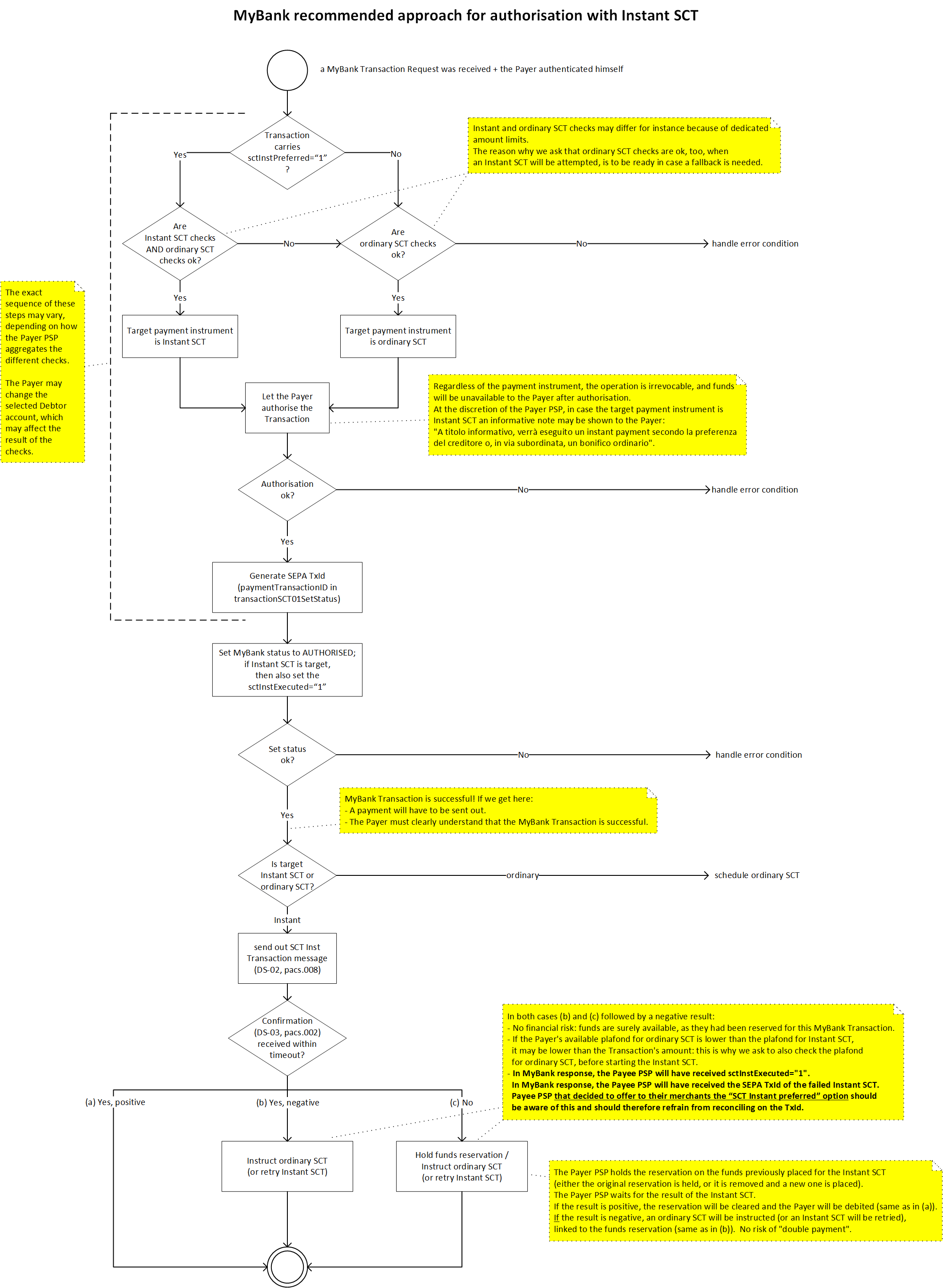
If the MyBank transaction indicates that Instant SCT is the preferred payment instrument, then the MyBank transaction (if authorised) may imply the execution of an Instant SEPA Credit Transfer.
In all other cases, the MyBank transaction (if authorised) will imply the execution of an ordinary SEPA Credit Transfer.
Further details will be provided in the SCT / SCT Inst execution section.
Note that all MyBank transactions are in Euro. If the Payer has a non-Euro account at the Payer PSP, then the currency conversion must be done by the Payer PSP. The currency conversion process lies outside the scope of the MyBank specifications; however, the Payer PSP must show to the Payer the amount of the transaction in both the account currency and in Euro, as specified below.
The MyBank Authorisation page should be similar to the "standard" Credit Transfer authorisation page of the Banking Application. It MUST include:
-
MyBank logo (same requirements as for MyBank Login page).
-
Countdown to the expiration of the transaction (same requirements as for MyBank Login page).
-
Optionally (and consistently with "standard" authorisation pages), the payment (debtor) account. The Payer PSP may present the Payer a choice of payment accounts.
-
Details of the MyBank transaction, comprising:
- Amount of the transaction in Euro (
transactionSCT01DB.amount).
In case of non-Euro payment account, a text detailing the conversion from the amount of the SCT to the amount in the currency of the account (the text should include: amount in account’s currency, exchange rate applied for currency conversion, all fees or commissions by the currency conversion executor). - Amount of the fees applied, even if they amount to 0 EUR, and amount of the corresponding total [added in 2024].
- Order description (
transactionSCT01DB.orderDescription), if present. - Merchant Trading Name (
transactionSCT01DB.merchantTradingName). - Application level reference of the MyBank transaction as assigned by the Payee (
transactionSCT01DB.endToEndID).
Note: the Payer PSP may show additional data, that should be limited to the ones necessary to respect any national regulation for the initiation of a SEPA Credit Transfer, consistently with "standard" authorisation pages.
However, the Payer PSP MUST NOT display the IBAN of the Payee account. Only if the Payer PSP’s two-factor authentication process links the authentication to a specific beneficiary via an IBAN, then the Payer PSP must minimise the display of the Payee IBAN to only those parts essential to the Payer to complete the authentication.
The Payer PSP SHOULD NOT display the execution date of the payment.Note: the Payer PSP MUST NOT let the Payer amend any of the above information.
- Amount of the transaction in Euro (
-
Irrevocability Warning: a textual warning that warns the Payer that he is about to make an irrevocable credit transfer. Example: "By clicking confirm you will make an irrevocable payment. This action cannot be undone".
-
Fields and elements necessary for the authorisation process ("OTP" field, "Confirm" button, ...). The authorisation process must be the same as provided by the Payer PSP for authorising in the specific channel a credit transfer of the given amount (in compliance with PSD2 and applicable regulations). For payments that do not exceed 30 Euro, the Payer PSP should not require the use of a two-factor authentication process.
-
"Cancel" button (same requirements as for MyBank Login page).
After presenting the MyBank Authorisation page, the Payer PSP must inform MyBank Gateway that the transaction data were displayed, by invoking the Transaction Set Milestone API (passing the key "TRANSACTION_DATA_DISPLAYED").
Behavior:
-
When the countdown ends: same requirements as for MyBank Login page.
-
If the "Cancel" button is clicked: same requirements as for MyBank Login page.
-
As per MyBank rules, an authorised MyBank transaction must always be followed by a payment: this is a crucial Payer PSP's responsibility.
Hence, BEFORE confirming that a MyBank transaction has been authorised (i.e., BEFORE setting the transaction's status to"AUTHORISED"), the Payer PSP must make all necessary checks to ensure that the credit transfer will be correctly executed.
These checks may include:- AML checks
- verify the balance of the Buyer’s payment account to check that there are sufficient funds or credit lines
- check the amount of the transaction against maximum amount limits set for that customer
- apply any anti-fraud policy or algorithm
Upon successful verification of the authorisation credentials, the Payer PSP must invoke the Transaction Set Status API setting the transaction's status to
"AUTHORISED". Note that:- In order to be able to invoke this API, the Payer PSP will have to provide the
paymentTransactionID: this is the value that will be used by the Payer PSP asTxIdof thepacs.008corresponding to the ordinary or Instant SCT. - The invocation of the API will fail in case MyBank Gateway finds that the MyBank transaction has expired.
- In general, the Payer PSP must consider any case of unsuccessful invocation of the API as an unrecoverable technical error (see below): in this case, the payment must not be executed.
One particularly complex scenario is when the invocation of the Transaction Set Status API appears to fail because of network issues. If the Payer PSP cannot be sure whether the MyBank Gateway received the information of the status or not, the Payer PSP is recommended to query the status by invoking the Transaction Fetch API.
If the MyBank transaction's status has been successfully set to
"AUTHORISED":- The Payer PSP may reserve the funds of the Payer, immediately debit the Payer, etc. to ensure execution of the corresponding credit transfer.
- The Payer PSP MUST irrevocably schedule the execution of the ordinary or Instant SCT (more details will be provided in the SCT / SCT Inst execution section).
The Payer PSP MUST accept that it has ‘received’ the payment order under the terms of PSD2 (Article 78). The payment order is irrevocable by the Payer as defined by PSD2 (Article 80).
The Payer PSP MUST NOT allow the customer to revoke, cancel or otherwise undo this payment instruction, either by online or other means. - The Payer PSP must present the MyBank Status Confirmation page.
- The Payer PSP should notify the Payer of the transaction details in an out-of-band manner (e.g. e-mail, SMS …), consistently with the "standard" behavior of the Banking Application, so the Payer gets informed in case this authorisation was performed by a third party.
Note: the recommendation to set the transaction's status to
"AUTHORISED"first, and then take care of the execution of the Credit Transfer, is based on the assumptions that:- the likelihood that the scheduling of the Credit Transfer fails is lower than the likelihood that the setting of the transaction's status fails: given that all relevant applicative checks have already been performed, "scheduling the Credit Transfer" should roughly correspond to an insert/update operation on the database of the banking application;
- manual recovery/sanitizing is easier in case the setting of the transaction's status succeeds and the scheduling of the Credit Transfer fails, rather than vice versa.
Payer PSPs are encouraged to challenge these assumptions, as applicable to their particular organization, and discuss this crucial topic with the Solution Manager.
Other implementation notes:
- The MyBank Authorisation page must generally be in line with the "standard" Credit Transfer authorisation page of the Banking Application. However, it MUST NOT offer any other links that navigate away from the authorisation flow. The Payer PSP must not force the Payer to visit new pages, close pop-ups or perform any other action that may interrupt the flow, unless this is part of the standard authorisation process.
- In case the Payer fails to authorise the transaction due to wrongly inserted credentials, the Payer PSP MUST let the Payer retry the process.
After a maximum number of retries (if foreseen by Payer PSP's normal policy), the Payer PSP must invoke the Transaction Set Status API setting the transaction's status to"ERROR"andbusinessError="1", and then it must present the MyBank Status Confirmation page (showing a user-oriented explanation message). - Any attempt to use the browser's BACK button should be blocked, as much as possible in the Banking Application technology stack.
Any attempt to close the browser (or Mobile App) should either be blocked, or it should trigger the invocation of the Transaction Set Status API, setting the transaction's status to"AUTHORISINGPARTYABORTED". - Should any unrecoverable technical error occur (for example, during the verification of the Payer's credentials), the Payer PSP must invoke the Transaction Set Status API setting the transaction's status to
"ERROR"andbusinessError="0", and then it must present the MyBank Status Confirmation page (showing a user-oriented explanation message).
MyBank Status Confirmation page
When the MyBank transaction is in a final status, the Payer will be presented the MyBank Status Confirmation page.
In most cases, this will happen after an explicit action by the Payer (either successful authorisation, or cancellation). The final status may also reflect the transaction having expired, or an error condition having occurred.
The goal of MyBank Status Confirmation page is to clearly describe the outcome of the transaction, and to allow the Payer to be redirected back to the Merchant's website or app.
The MyBank Status Confirmation page should be similar to either the "standard" Credit Transfer confirmation or error page of the Banking Application. It MUST include:
-
MyBank logo (same requirements as for MyBank Login page).
-
A short generic message confirming the final status of the transaction. For example:
- For
"TIMEOUT": Time has expired. The MyBank payment cannot be authorised. - For
"AUTHORISED": The MyBank payment has been successfully authorised. - For
"AUTHORISINGPARTYABORTED": The MyBank payment has been cancelled. - For
"ERROR": The MyBank payment has been cancelled.
- For
-
Only in case the status of the transaction is
"ERROR":-
An additional user-oriented explanation message, describing the nature of the error.
In all cases where the Payer PSP decides to disallow or refuse the authorisation of a MyBank transaction (thus setting its final status to “ERROR”), a specific user-oriented message should be shown to the Payer. Noteworthy examples might be:- Credit transfer orders are not allowed when using a VPN due to the Payer PSP’s policy.
- The Payer’s account is blocked.
- The transaction is suspected to be a fraud due to the Payer PSP’s policy.
- The Payer’s daily/weekly/monthly amount limit for credit transfers has been reached.
- The Payer is not allowed to order credit transfers towards foreign accounts.
- Double authorization (which is not possible with MyBank transactions) is required for this Payer’s account.
- The Payer is not allowed to order credit transfers towards foreign accounts.
- The Payer’s daily/weekly/monthly amount limit for credit transfers has been reached.
- The transaction is suspected to be a fraud due to the Payer PSP’s policy.
- The Payer’s account is blocked.
- Credit transfer orders are not allowed when using a VPN due to the Payer PSP’s policy.
-
Details of the failed MyBank transaction, comprising:
- Application level reference of the MyBank transaction as assigned by the Payee (
transactionSCT01DB.endToEndID). - Amount of the transaction in Euro (
transactionSCT01DB.amount). - Order description (
transactionSCT01DB.orderDescription), if present. - Merchant Trading Name (
transactionSCT01DB.merchantTradingName).
Note: the Payer PSP may show additional data, consistently with "standard" error pages.
However, the Payer PSP MUST NOT display the IBAN of the Payee account. - Application level reference of the MyBank transaction as assigned by the Payee (
-
A message expressly asking the Payer not to close the browser or Mobile app, and asking to press the button to be redirected to the Merchant's website or app. Example: "Please don’t close the browser. Please press the button below to be redirected to the Seller".
-
-
Only in case the status of the transaction is NOT
"ERROR":- A message expressly asking the Payer not to close the browser or Mobile app, and asking to either press the button to be redirected to the Merchant's website or app or just wait for the automatic redirection. Example: "Please don’t close the browser. You are being redirected to the Seller in a few seconds. If automatic redirection does not work, please press the button below".
-
"Return to Merchant" button.
Behavior:
- If the "Return to Merchant" button is clicked: the Payer must be redirected to the Merchant's website or app (
transactionSCT01DB.initiatingPartyReturnURL). - Only in case the status of the transaction is NOT
"ERROR": the Payer must be automatically redirected to the Merchant's website or app in 5 seconds.
Other implementation notes:
-
The MyBank Status Confirmation page must generally be in line with the "standard" Credit Transfer confirmation or error page of the Banking Application. However, it MUST NOT offer any other links that navigate away from the authorisation flow. The Payer PSP must not force the Payer to visit new pages, close pop-ups or perform any other action that may interrupt the flow.
-
Please note that, if the Banking Application has a concept of "session", the session timeout must be suitably adjusted so that the logic described in this implementation guide can work. In particular:
- Session timeout must not occur before
transactionSCT01DB.transactionValidityEndhas been reached.
If the authenticated session needs to be timed out beforetransactionSCT01DB.transactionValidityEndto comply with PSD2, the Payer MUST be brought back to MyBank Login page, and will thus be able to resume the authorisation process. - If the session is needed to perform the automatic redirection from MyBank Status Confirmation page to the Merchant's website, then the session timeout must further take into account the 5 seconds delay foreseen before such redirection.
- Session timeout must not occur before
-
Any attempt to use the browser's BACK button or to close the browser (or Mobile App) should be blocked, as much as possible in the Banking Application technology stack.
Specific requirements for Mobile ChannelsConsidering the redirection of the Payer back to the Merchant's website or app in a mobile environment:
The Payer PSP must instruct the operating system to open the URL provided by the Payee (transactionSCT01DB.initiatingPartyReturnURL), without changing any part of the URL (including the scheme name).If the Payer is using a web-based Payer PSP's Banking Application, this simply means that the Payer PSP must issue a normal HTTP redirection to the URL provided by the Payee.
If the Payer is using a Payer PSP's Mobile App, the requirement above also implies that the Payer PSP MUST NOT open the Merchant's website using a browser component embedded in the Payer PSP's Mobile App.
SCT / SCT Inst execution
If a MyBank transaction has been successfully set to "AUTHORISED", the Payer PSP MUST in principle execute:
If
- the MyBank transaction indicates that Instant SCT is the preferred payment instrument (
transactionSCT01DB.sctInstPreferredis"1") - and the Payer PSP can reach the Beneficiary Account (
transactionSCT01DB.merchantIBAN) with an Instant SCT - and the execution of an Instant SCT is allowed by the Payer PSP's policies (e.g., SCT Inst daily amount limit, SCT Inst anti-fraud rules, etc.) and by SEPA Instant Credit Transfer’s schema restrictions (e.g., maximum amount allowed by the schema),
a SEPA Instant Credit Transfer (we say that the "target payment instrument" is Instant SCT).
In all other cases,
a SEPA ordinary Credit Transfer (we say that the "target payment instrument" is ordinary SCT).
In case the target payment instrument is Instant SCT, but the execution of the Instant SCT fails (negative result received from the Beneficiary bank), the Payer PSP is required to fall back on the execution of an ordinary SCT (or, alternatively, implement a retry mechanism).
Please note that:
- The Instant Payment Regulation (Regulation (EU) 2024/886) is considered applicable to Participants acting in the role of Payer Payment Service Provider (Payer PSP) in the MyBank framework.
- Every Payer PSP bears sole responsibility for the decision to implement at this stage the Instant SCT feature within the MyBank framework.
- The implementation approach outlined in the picture below is considered as the most appropriate to respect the spirit of the Regulation, and is designed to maintain the flow, integrity, and value of the MyBank solution, while also mitigating the impact on the MyBank community.
The Payer PSP must either follow such recommended approach, or discuss any proposed deviation with PRETA before implementing it, to ensure interoperability and integrity of MyBank.
In all cases, the coherence between MyBank Transaction's status and actual execution of the (instant) payment must be guaranteed. Coordination with PRETA will be required to conduct validation testing before the solution is put into production.
MyBank transactions carry a Requested Execution Date (transactionSCT01DB.requestedExecutionDate) which is always set to the current date (of the day when the transaction has been initiated: beware that a transaction may be initiated just before midnight).
SEPA Credit Transfers MUST be executed within the timeframe dictated by the Payments Services Directive. The Payee must receive the funds within the time frame dictated by the Payments Services Directive, i.e. "after the [confirmation from the Payer PSP to the Payer], the amount of the payment transaction is credited to the [Payee’s] payment service provider's account at the latest by the end of the next business day".
On the other hand, if a MyBank transaction has NOT been successfully set to "AUTHORISED", the Payer PSP *MUST NOT execute a credit transfer.
Respect of these MyBank end-to-end principles is a *MUST requirement on Payer PSPs.
To reinforce respect of these principles, the Payer PSP must have internal procedures in place that:
- Detect any mismatches.
- Take prompt action to mitigate any business impact of mismatches.
- Immediately inform MyBank Solution Manager of any mismatches.
As further reminder
The Payer PSP MUST NOT allow the customer to revoke, cancel or otherwise undo this payment instruction, either by online or other means.
If a MyBank transaction has been successfully set to
"AUTHORISED", the Payer PSP MUST in any case honour the sending of the credit transfer, unless the execution of the payment is prohibited (i) by the national or Community legislation and regulations and/or (ii) by an order/act by any public authority who is entitled to do so and/or by the MyBank Solution Documentation including the “MyBank Restricted Business categories” paper.
Credit transfers originated from MyBank transactions MUST be compiled by the Payer PSP respecting the mapping rules described here below ("M" means "mandatory", "O(M)" means "optional, but mandatory if the value is present"):
- The following mapping rules apply to ordinary SCT only:
| SCT Message element | SCT X-Path | Value |
|---|---|---|
| +Credit Transfer Transaction Information ++Payment Type Information +++Local Instrument ++++Proprietary | M: /Document/FIToFICstmrCdtTrf/CdtTrfTxInf/PmtTpInf/LclInstrm/Prtry | "MBNKCT01" |
| +Credit Transfer Transaction Information ++Payment Type Information +++Category Purpose ++++Code | M: /Document/FIToFICstmrCdtTrf/CdtTrfTxInf/PmtTpInf/CtgyPurp/Cd | "EPAY" |
- The following mapping rules apply to Instant SCT only:
| SCT Message element | SCT X-Path | Value |
|---|---|---|
| +Group Header ++Payment Type Information +++Category Purpose ++++Proprietary | M: /Document/FIToFICstmrCdtTrf/GrpHdr/PmtTpInf/CtgyPurp/Prtry | "MBNKCT01" |
- The following mapping rules apply to both ordinary and Instant SCT:
| SCT Message element | SCT X-Path | Value |
|---|---|---|
| +Group Header ++Interbank Settlement Date | M: /Document/FIToFICstmrCdtTrf/GrpHdr/IntrBkSttlmDt | For SCT, at most 1 Target Day later than confirmedExecutionDate. For SCT Inst, confirmedExecutionDate. |
| +Credit Transfer Transaction Information ++Payment Identification ++End To End Identification | M: /Document/FIToFICstmrCdtTrf/CdtTrfTxInf/PmtId/EndToEndId | transactionSCT01DB.endToEndID |
| +Credit Transfer Transaction Information ++Payment Identification +++Transaction Identification | M: /Document/FIToFICstmrCdtTrf/CdtTrfTxInf/PmtId/TxId | paymentTransactionID |
| +Credit Transfer Transaction Information ++Interbank Settlement Amount | M: /Document/FIToFICstmrCdtTrf/CdtTrfTxInf/IntrBkSttlmAmt | transactionSCT01DB.amount |
| +Credit Transfer Transaction Information ++Debtor +++Name | M: /Document/FIToFICstmrCdtTrf/CdtTrfTxInf/Dbtr/Nm | buyerName |
| +Credit Transfer Transaction Information ++Debtor Account +++Identification ++++IBAN | M: /Document/FIToFICstmrCdtTrf/CdtTrfTxInf/DbtrAcct/Id/IBAN | buyerIban |
| +Credit Transfer Transaction Information ++Debtor Agent +++Financial Institution Identification ++++BIC | M: /Document/FIToFICstmrCdtTrf/CdtTrfTxInf/DbtrAgt/FinInstnId/BIC | buyerBic |
| +Credit Transfer Transaction Information ++Creditor Agent +++Financial Institution Identification ++++BIC | M: /Document/FIToFICstmrCdtTrf/CdtTrfTxInf/CdtrAgt/FinInstnId/BIC | transactionSCT01DB.merchantBankBIC |
| +Credit Transfer Transaction Information ++Creditor +++Name | M: /Document/FIToFICstmrCdtTrf/CdtTrfTxInf/Cdtr/Nm | transactionSCT01DB.merchantName |
| +Credit Transfer Transaction Information ++Creditor +++Identification ++++Organisation Identification +++++Other ++++++Identification | M: /Document/FIToFICstmrCdtTrf/CdtTrfTxInf/Cdtr/Id/OrgId/Othr/Id | transactionSCT01DB.initiatingPartyID |
| +Credit Transfer Transaction Information ++Creditor Account +++Identification ++++IBAN | M: /Document/FIToFICstmrCdtTrf/CdtTrfTxInf/CdtrAcct/Id/IBAN | transactionSCT01DB.merchantIBAN |
| +Credit Transfer Transaction Information ++Ultimate Creditor +++Name | M: /Document/FIToFICstmrCdtTrf/CdtTrfTxInf/UltmtCdtr/Nm | transactionSCT01DB.merchantTradingName Attention: the format of this attribute is "Max 70UTF8", which means that the value may include any "special" or non-latin character (e.g., à ü Ψ 创) |
| +Credit Transfer Transaction Information ++Ultimate Creditor +++Identification ++++Organisation Identification +++++Other ++++++Identification | O(M): /Document/FIToFICstmrCdtTrf/CdtTrfTxInf/UltmtCdtr/Id/OrgId/Othr/Id | transactionSCT01DB.initiatingPartySubID Attention: this attribute may be absent or empty. |
| +Credit Transfer Transaction Information ++Remittance Information | O(M): /Document/FIToFICstmrCdtTrf/CdtTrfTxInf/RmtInf | Either transactionSCT01DB.remittanceInformation (in <Ustrd>) (if non-empty) or transactionSCT01DB.remittanceInformationXML (in <Strd>; note that the value will be in the form "<Strd>…</Strd>") (if non-empty) Attention: both attributes may be absent or empty. |
Note that:
- Receipts and confirmations released to Payers in reference to the authorisation of a MyBank transaction MUST [SHOULD if you joined MyBank before 2023] clearly state that the concerned operation is in fact a MyBank payment.
- Account statements and payment order lists, regardless of whether on paper, pdf, or web/mobile applications, MUST [SHOULD if you joined MyBank before 2023] show an appropriate description for MyBank transactions (e.g., “MyBank”, “MyBank payment”, etc.).
- Account statements and payment order lists should show the name of the beneficiary as known by the Payer, i.e.
transactionSCT01DB.merchantTradingName.
Further requirements and recommendations for Payer PSPs
-
The Payer PSP MUST ensure that first-time MyBank Payers are able to authorise their first MyBank transaction without stopping the authorisation process. For example, first–time users should not be asked to agree to MyBank usage by redirection to another part of the online banking as they are then very likely to abandon the process.
-
The Payer PSP MUST ensure that the mechanism(s) used for authorising MyBank transactions are at least as secure as those used for authorising credit transfers initiated directly with the Payer PSP’s online banking website or mobile banking website or App.
The Payer PSP’s two-factor authentication process must be compliant with the requirements imposed by the PSD2 and the associated Regulatory Technical Standards. This includes using a time limited password and linking the authentication to a specific amount and beneficiary. -
The Payer PSP *MUST ensure the confidentiality and integrity of all MyBank related business data.
-
The Payer PSP *MUST promptly react if fraudulent or incorrect behaviour has been detected.
The Solution Manager is to be advised as soon as possible about any disputed transactions and/or alleged frauds. -
The Payer PSP should provide the Payer the list of transactions in their Online/Mobile Banking platform, including MyBank transactions.
Immediately after a MyBank transaction has been assigned a final status, the Payer PSP MUST provide the Payer with a means of verifying the status of the transaction even if he has since been redirected back to the Seller. Examples of acceptable mechanisms are: SMS, email, App notification, credit transfers list within the online banking, etc. -
The Payer PSP MUST store offline all messages exchanged with the MyBank Gateway for how long as required by the regulations applying to the corresponding SCT payment data.
-
The Payer PSP MUST ensure that its system clocks are accurate to within 2 seconds.
-
A MyBank transaction is defined to have been blocked by a party if
-
The Party prevents the authorisation of the transaction through a non-compliance to the MyBank specifications and requirements, or
-
The Party prevents the Payee from being promptly informed that the transaction has been authorised.
A Party's MyBank Service is defined to be unavailable during a given period (period of unavailability) if all transactions processed within that period are blocked by the Party. By definition, a period of unavailability must have at least two consecutive transactions blocked by the Participant.
Examples of periods of unavailability: -
A Payer PSP blocks a transaction at 09:15, another at 09:30 with no other transactions in between and no other blocked transactions that day. In this case the Payer PSP is unavailable for 15 minutes.
-
A Payer PSP blocks a transaction at 09:15, allows a transaction to be authorised at 09:20 and blocks a transaction at 09:30 with no other transactions blocked that day. In this case the Payer PSP has no periods of unavailability.
The Payer PSP *MUST ensure that their respective MyBank Services are available for at least 99% of each calendar day (including weekends, holidays and non-Target days).
The Payer PSP *MUST agree with the Solution Manager a period of planned unavailability with a notice of 5 working days - the SLA will not be applicable within such agreed periods. Parties must take into account their typical MyBank transaction usage profile when planning unavailability.
-
-
When a single Participant plays the parts of both the Payer PSP and the Payee PSP for a MyBank Transaction (and so settlement can occur internally) the Payer PSP must use the MyBank Gateway for processing the transaction.
-
Obligations of Payer PSPs regarding Verification of Payee (VoP) within MyBank:
The rationale behind (the “ratio legis”) the whole relevant legal framework is to avoid unintended payments due to incorrect payment data of the payee.
The MyBank Solution is already consistent with the requirements of the verification of the accuracy of the information regarding the payee, based on the facts that:
(i) any information regarding the payee is provided by the Payee PSP (as part of the MyBank transaction flow, when initiating the transaction), and
(ii) the payer is in the condition to validate such information (in the meaning of Instant Payment Regulation, i.e. to check such data) prior to authorise the execution of any payment.
Updated about 1 month ago